
Costs
Part of Designing video advertising with a checklist built around the audience job
A realistic take on video advertising tools in 2027
Video advertising tools should be compared across 12 jobs: production, rights, accessibility, delivery, identity, verification, analytics, and control.
What to take away
- The 12 lanes are tool categories, not ranked vendors or endorsements.
- Compare interactivity and creative identity as separate technical jobs.
- Pilot delivered assets, failure handling, evidence export, and replacement.
- The tools named below are real products; confirm current support and pricing before you buy.
Video advertising tools should be chosen for a defined operating gap, not a logo. The 12 lanes run in this order:
- Plan
- Script
- Produce
- Edit
- Manage assets
- Clear rights
- Caption
- Describe for accessibility
- Serve ads
- Build interactivity
- Carry a creative identity
- Verify and analyze
Team size sets how many lanes you buy. A one-person team usually needs plan, edit, caption and serve. Rights, assets, interactivity and verification arrive with higher spend or regulated clients. Serving and verification scale with volume, so they carry the largest recurring bill.
Why this belongs in PPC optimization
Video is not a separate island from paid search and paid social. In a PPC account, video assets often sit inside the same campaign structure, budget rules, audience tests and conversion reporting as search and display ads.
The 12 lanes below matter because each one creates a control point for paid media optimization: faster creative iteration, cleaner ad serving, reliable captioning and accessibility, and verification data that can be reconciled with spend and conversions.
If you manage PPC or paid media, use this article to decide which video tool gaps affect campaign performance. Test those tools against your own account data, not a vendor demo.
For a PPC manager, the video tool decision is a campaign optimization decision. The plan and script lanes shape ad copy and offer test variants. Produce and edit lanes determine how fast you can refresh creative in paid social and video campaigns. Serve and verify lanes control delivery, fallbacks, and reconciliation with spend and conversions.
Choose tools by the PPC bottleneck they remove: slow creative tests, missing captions, broken tags, or unverifiable delivery. Then judge the tool with the same account data you use for search and display.
Ranked shortlist by lane
Lead option
- Plan
- Adobe Workfront for governance
- Produce and edit
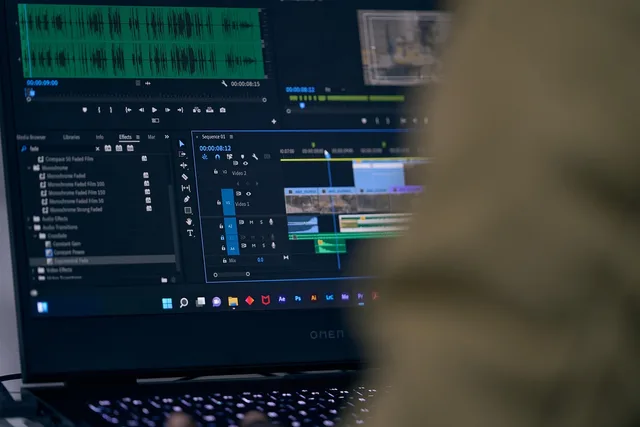
- Premiere Pro inside Adobe
- Review and assets
- Frame.io for comments
- Accessibility
- Rev for caption price
- Serve
- Google Campaign Manager 360 for scale
- Interactivity
- Innovid for shoppable CTV
- Creative identity
- Ad-ID for the registry
- Verify
- DoubleVerify for pre-bid control
Where the rival wins
- Plan
- Asana for light briefs
- Produce and edit
- DaVinci Resolve on color work
- Review and assets
- XR for master distribution
- Accessibility
- 3Play Media for audio description
- Serve
- SpringServe for CTV inventory
- Interactivity
- Kerv for custom builds; BrightLine for apps
- Creative identity
- Flashtalking and Innovid for tag carry
- Verify
- Integral Ad Science for context
Ranked for a first pilot, not scored: Campaign Manager 360, Rev, Frame.io, DoubleVerify. Serve first. Then captions, review and verification. Add rights and assets when licensing risk grows.
One product can cover several lanes, but each lane needs its own acceptance test.
| Tool lane | Pilot task | Exit artifact |
|---|---|---|
| Plan and script (Adobe Workfront, Asana) | Translate one customer job into approved claims and versions | Brief, script, storyboard, evidence, and decision history |
| Produce and edit (Premiere Pro, DaVinci Resolve, Frame.io) | Create representative ratios, durations, sound states, and languages | Master files, project files, fonts, color, mix, and export settings |
| Rights and assets (XR, Ad-ID) | Approve, expire, recall, and replace a licensed element | Rights register, stable IDs, versions, and recall log |
| Accessibility (Rev, 3Play Media) | Caption, describe, transcribe, and test the actual player | Source text, reviewed files, test record, and open issues |
| Serve and interact (Campaign Manager 360, Innovid, SpringServe) | Deliver files, tags, fallbacks, clicks, remotes, and errors | Specifications, tags, IDs, logs, and compatibility results |
| Verify and analyze (DoubleVerify, Integral Ad Science, Nielsen) | Reconcile delivery, quality, customer events, and finance | Definitions, raw exports, mappings, calculations, and restatements |
Test the SIMID interactivity layer: Innovid, Kerv and BrightLine
IAB Tech Lab's Secure Interactive Media Interface Definition page describes SIMID as a secure container that lets a player and interactive ad creative communicate.
Innovid builds shoppable and interactive CTV formats on SIMID. Kerv Interactive and BrightLine ship interactive units for streaming apps. Innovid has the widest CTV reach and the heaviest setup. Kerv Interactive fits tightly art-directed builds. BrightLine suits apps that want interactive formats without swapping the ad server.
Confirm the SIMID version and the players that run it. Check platform support, security review, fallback behavior, measurement and live adoption.
SIMID Interactivity Checks
- Confirm SIMID version
- Check player support
- Check platform support
- Review security isolation
- Test fallback behavior
- Verify measurement events
- Confirm actual adoption
Score supported formats and environments, not logos: browsers, apps, operating systems, connected TVs and players. Record aspect ratios, durations, languages, markets and tags. Mark planned support separately from live tested support.
Record caption formats, identifiers, APIs and data-retention limits. A format that passes in one player can fail in another, so video advertising best practices treat tested support as the baseline.
Test persistent creative identity: Ad-ID, Flashtalking and Innovid
IAB Tech Lab's Ad Creative ID Framework describes how a persistent video-ad identifier is registered and carried across supply-chain phases.
Ad-ID, the registry run by the 4A's and the ANA, issues the 12-character codes that those handoffs point back to. Flashtalking, part of Mediaocean, and Innovid attach creative IDs and verification-ready tags to served impressions.
Ad-ID is the register of record, while Flashtalking and Innovid carry the ID in the ad call, so the two jobs complement each other. The framework page does not establish adoption, data quality, or a tool's compatibility.
Creative ID Handoff Tests
- Use owned representative files and broken variants
- Test crop, sound, captions, disclosure, destination, events
- Review users, roles, integrations, logs, security, recovery
- Price licenses, media, storage, rendering, seats, support
- Export full asset and evidence package
- Run bounded replacement or manual fallback
Do not let a tool generate or alter material claims without approval. Preserve inputs, prompts where used, versions and outputs. Keep edits, reviewers and rejected assets on record. Establish who can publish, pause, recall, correct and delete content.
Test cost, portability and exit: XR, Frame.io and Rev
GOV.UK technology selection guidance recommends adaptable choices, data control, security review, and ownership-cost analysis. Those public-service questions apply when display advertising tools are compared by inventory, fees, and exit terms, and they are not product endorsements.
GOV.UK open standards guidance links open standards with interoperability and reduced supplier dependence, so test whether tool data and definitions can move.
Prices here are US-market list prices quoted in 2026. Buyers outside the United States should confirm the billing currency, the tax applied, and whether the vendor's rate differs.
Some lanes carry public prices. Rev lists English human captions near $2 per minute and machine captions near $0.25 per minute, with rush and translation fees on top.
Frame.io paid seats run roughly $15 to $25 per user per month. XR, Campaign Manager 360, Innovid and DoubleVerify quote per volume. Budget for impression or storage tiers, setup, migration and recurring labor.
Give each tool the same source sample, user roles, required output, failure case and export task. Measure setup time, recurring labor, specialist help, correction work and shutdown effort.
A feature earns credit only when an intended user completes the task safely. Save the tested plan and its date. A current product page does not promise the same function or price in 2027.
The 2027 outlook
SIMID keeps moving in minor revisions. Check the version IAB Tech Lab publishes, and re-test player support, because interactive fallbacks break first when a player updates.
Creative-ID adoption stays uneven. Registry-first workflows should grow as buyers demand reconciliation, but do not assume that every 2027 impression carries a valid ID. Test the tags you actually buy.
Pricing is shifting from flat seats to tiers with usage caps. Expect review, captioning and verification tools to meter renders, storage or impressions rather than people. Serving stays volume-priced.
Ask each vendor for a written roadmap for 2027, or fall back to the exit plan you already costed.
Common questions
Should one suite handle all 12 jobs?
Only if each job meets its evidence, control, compatibility, service and cost requirements, plus security, portability and exit.
Is SIMID a video player?
No. It defines communication for interactive ad creative and the player; implementation still depends on supported systems.
Why use a creative ID?
A persistent identifier can support reconciliation and other operations when it is registered, carried, validated, and reported correctly.
Which tools fit a small team?
Frame.io for review, Rev for captions and a Campaign Manager 360 seat for serving cover three lanes. Add verification and asset management when spend or rights risk grows.